

Level 24 → 25: Brute Force (Loops and Automation)
The Challenge
The Objective: You are currently logged in as bandit24. Your objective is to find the password for bandit25. A daemon (background service) is listening on port 30002 on the local machine. It will give you the password, but only if you provide the correct credentials.
The Constraints:
- You are logged in as
bandit24. - The service expects you to submit your current
bandit24password, followed by a space, followed by a secret 4-digit numeric PIN (e.g.,UoMYTrfrBF... 1234). - You do not know the PIN. There are 10,000 possible combinations (0000 to 9999).
- You must systematically guess every single combination until the server accepts one.
The Solution
The Concept: Bash Loops and Brute-Forcing Manually typing 10,000 passwords into Netcat would take days. In computer science, this is solved with a “brute-force attack”—using a computer’s raw processing speed to guess every possible combination in seconds.
To do this in Linux, we use a for loop. A for loop tells the computer: “Take this list of items, and perform this exact action on every single one of them, one by one, until the list is empty.”
In Bash, you can generate a zero-padded list of numbers from 0 to 9999 simply by typing {0000..9999}. By placing this inside a loop, you can instruct the system to echo your password and the current number, and immediately pipe that generated text directly into Netcat.
Furthermore, we will use our old friend grep. Since 9,999 of our guesses will be wrong, the server will spam our terminal with “Wrong!” error messages. By piping the final output into grep -v "Wrong", the -v (invert) flag tells Linux to hide all the failures, leaving a perfectly clean screen that only displays the single successful password.
Execution: Writing the Attack Loop Follow these steps to construct the brute-force pipeline and extract the password.
Step 1: Retrieve your current bandit24 password so you have it ready to copy. Type the following command and press Enter:
Bash
cat /etc/bandit_pass/bandit24
(Copy the exact string to your clipboard).
Step 2: Construct the brute-force loop. Type the following command exactly as it appears below (replacing the placeholder password with your actual bandit24 password), then press Enter:
Bash
for i in {0000..9999}; do echo "UoMYTrfrBF... $i"; done | nc localhost 30002 | grep -v "Wrong"
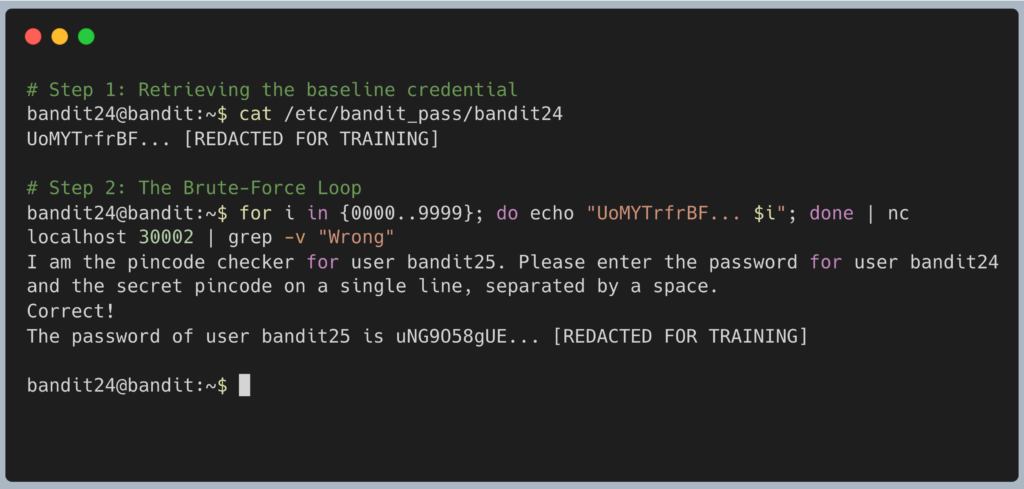
The terminal will pause for a few moments as it invisibly blasts the server with up to 10,000 login attempts. Once it hits the correct PIN, it will print the success message and the bandit25 password to your screen. Copy this text to your clipboard. Type exit to close your connection, and get ready to SSH back in as bandit25.
DevOps in the Wild This level perfectly demonstrates why a 4-digit PIN is completely useless for computer security unless it is paired with Rate Limiting. Because the Bandit server allows infinite, instantaneous login attempts, you cracked the PIN in about two seconds. In the real world, DevOps and Security engineers install tools like fail2ban on their servers. If a server detects 5 failed login attempts from the same IP address within a minute, it updates the firewall to instantly ban that IP address, completely neutralizing this type of brute-force attack.
Troubleshooting Pitfalls If your terminal is returning incorrect data or throwing errors, here is what went wrong:
- The terminal is flooded with “Wrong! Please enter the correct pincode” You forgot to add
| grep -v "Wrong"to the end of your command. The attack still worked, but the actual password is now buried somewhere in 10,000 lines of failure text. - The attack ran instantly and output absolutely nothing You likely made a typo in your
bandit24password, or you forgot to include the space between the password and the$ivariable. If every single guess was malformed, every guess failed, andgrephid all 10,000 failures, resulting in a blank screen. - Error:
syntax error near unexpected token 'done'When writing loops on a single line, semicolons (;) are mandatory. You must have a semicolon after{0000..9999}and another one after theechocommand so the system knows where the commands separate.