
Level 3 → 4: Hide and Seek (Hidden Files in Linux)
The Challenge
The Objective: You are currently logged in as bandit3. Your objective for this level is to find the password for the next level, which is stored in a hidden file located inside the inhere directory.
The Constraints:
- You are logged in as
bandit3. - Standard directory listing commands will make the target folder appear completely empty.
- You need to utilize specific command flags to force the system to reveal invisible files.
The Solution
The Concept: The Dotfile Trick If you move into the inhere directory and type ls, the terminal returns nothing. The folder looks completely empty.
In Linux, if a file or folder name starts with a period (like .hidden or .secret), the system automatically hides it from standard view. This was not originally designed as a security feature; it was actually a quirk in early Unix operating systems that developers eventually adopted as a standard feature to keep user directories from looking cluttered with configuration files. To see them, you have to explicitly ask the terminal to show you all files.
Execution: Locating and Extracting Follow these steps to expose the hidden file and extract the password.
Step 1: Move into the target directory. Type the following command and press Enter:
Bash
cd inhere
Step 2: Use the ls command with the -la (long format, all) flag to reveal hidden files alongside their permissions. Type the following command and press Enter:
Bash
ls -la
(You will now see the file named .hidden in the output.)
Now that you can see the file, read its contents.
Step 3: Type the following command exactly as it appears below, then press Enter:
Bash
cat .hidden
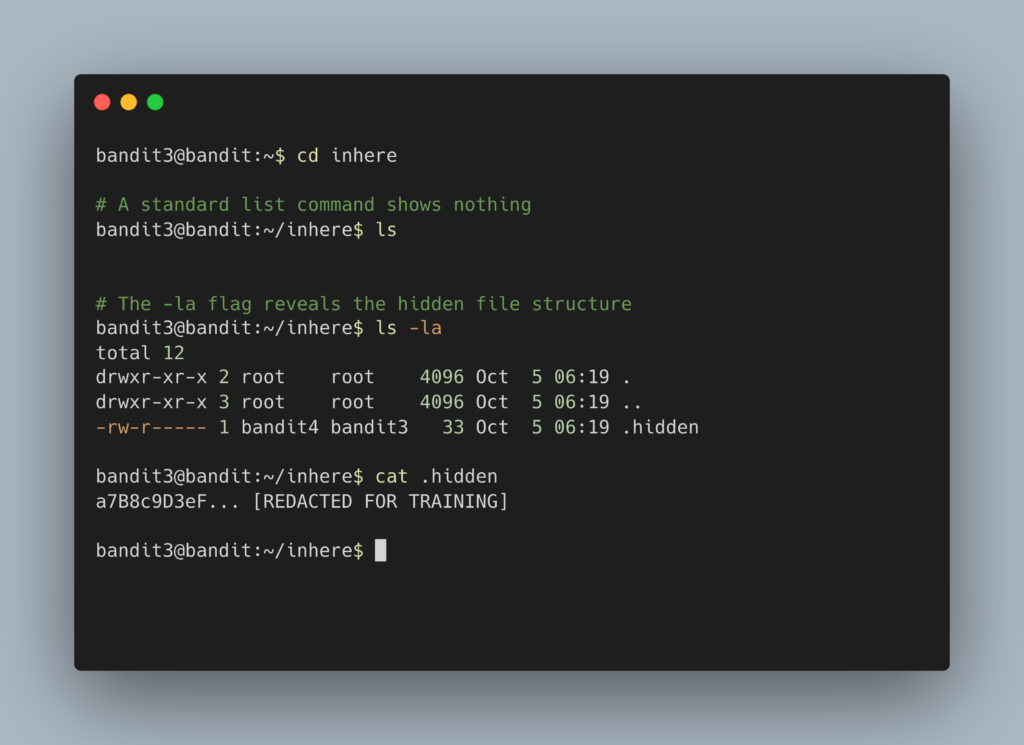
The terminal will output the password. Copy this text to your clipboard. Type exit to close your connection, and get ready to SSH back in as bandit4.
DevOps in the Wild Why do we hide files? In the real world, developers use hidden files—commonly called “dotfiles”—to store sensitive configuration data or application settings without cluttering the main project directory. For example, Git uses a hidden .git folder to track code changes, and modern web applications almost always use a .env file to securely store database passwords and API keys. Knowing how to reveal these files is step one in auditing or configuring a server.
Troubleshooting Pitfalls If you did not get the password, here is what likely went wrong:
- Error:
cat: .hidden: No such file or directoryYou forgot to move into theinheredirectory first. Typecd inhereand try again. Alternatively, you might have forgotten the period when typing the filename.cat hiddenwill fail; it must becat .hidden. - You type
lsand nothing happens: That is exactly what is supposed to happen. You must usels -aorls -lato instruct the terminal to show files that begin with a dot.