
Level 4 → 5: Identifying File Types (The Binary Trap)
The Challenge
The Objective: You are currently logged in as bandit4. Your objective for this level is to find the password stored in the inhere directory.
The Constraints:
- You are logged in as
bandit4. - The target directory contains 10 identically formatted files named
-file00through-file09. - Only one of these files contains human-readable text. The others contain raw binary data.
- You must identify the correct file without opening them blindly, as reading raw binary data can crash or scramble your terminal session.
The Solution
The Concept: Trusting the Header, Not the Extension In graphical operating systems, you know a file is a text document because it ends in .txt. Linux does not care about file extensions. A file can be named -file07 and be a text file, an image file, or a compiled software program.
If you use the cat command to open a compiled binary program, the terminal will try to render the raw computer code as if it were the alphabet. This will flood your screen with garbage characters, beep loudly, and scramble your terminal’s character encoding.
To avoid this, you must use the file command. The file command peeks inside the file’s binary header (its “magic number”) and tells you exactly what kind of data it holds before you attempt to read it.
Execution: Locating and Extracting Follow these steps to safely identify and read the text file.
Step 1: Move into the target directory. Type the following command and press Enter:
Bash
cd inhere
Step 2: Use the file command to scan everything in the directory simultaneously. We use the wildcard * to select all files, and ./ to bypass the dashes in the filenames (a trick from Level 2). Type the following command and press Enter:
Bash
file ./*
(Review the output. You will see nine files listed as “data” and one listed as “ASCII text”.)
Now that you have identified the safe file, read its contents.
Step 3: Type the following command exactly as it appears below (substituting 07 for whichever number was identified as ASCII text in your terminal), then press Enter:
Bash
cat ./-file07
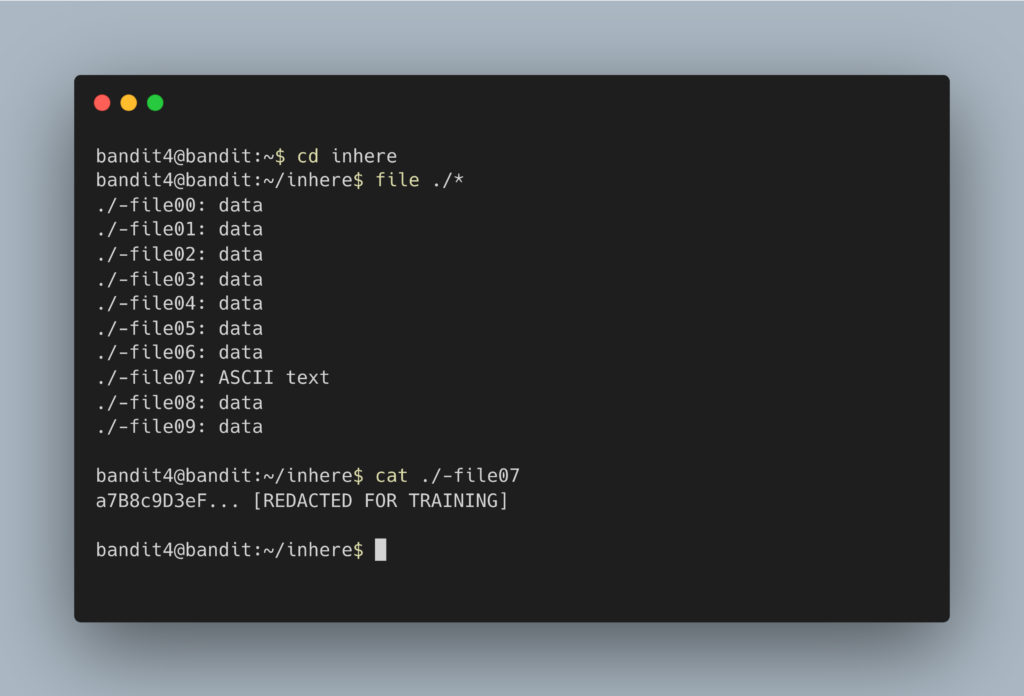
The terminal will output the password. Copy this text to your clipboard. Type exit to close your connection, and get ready to SSH back in as bandit5.
DevOps in the Wild Security analysts and system administrators use the file command constantly. If a malicious actor uploads a script to a web server but renames it to profile_picture.jpg to bypass basic security filters, the file command will instantly reveal that it is actually an executable script, not an image file. It is a fundamental tool for verifying file integrity.
Troubleshooting Pitfalls If your terminal is throwing errors or acting strangely, here is what went wrong:
- My terminal is printing alien symbols and is completely broken You guessed wrong and used
caton a binary file. Type the commandresetand press Enter to restore your terminal’s formatting. - Error:
file: unrecognized optionYou forgot the./before the wildcard. Because the files start with dashes, thefilecommand thinks you are passing it a configuration flag. Usefile ./*instead offile *.