

Level 18 → 19: Bypassing the Shell (Executing Commands over SSH)
The Challenge
The Objective: Your objective for this level is to find the password for bandit19 stored in a file named readme located in the home directory.
The Constraints:
- You have the password for
bandit18(which you acquired in the previous level). - Someone has deliberately modified the
.bashrcprofile file on thebandit18account. The moment you successfully authenticate, this script forces the server to instantly drop your connection before you can even type a command. - You cannot access an interactive terminal prompt.
The Solution
The Concept: SSH Command Execution and the .bashrc Trap When you log into a Linux server normally, the system loads a hidden configuration file called .bashrc (Bash Run Commands). This file sets up your terminal colors, aliases, and environment variables. If a malicious user (or a wargame creator) adds the exit command to the top of this file, the server will kick you out the second you log in, making interactive access impossible.
However, SSH is not just a tool for opening interactive terminals. It is fundamentally a secure execution tunnel. You can instruct the SSH client to log in, run one specific command, print the result to your local screen, and log out gracefully—entirely bypassing the interactive .bashrc loading sequence.
To do this, you simply append the Linux command you want to run to the very end of your standard SSH connection string.
Execution: Bypassing the Trap and Extracting Follow these steps to bypass the forced logout and extract the password.
Step 1: Construct your SSH command, but instead of pressing Enter immediately, append the cat readme command to the end of the line. Type the following command exactly as it appears below, then press Enter:
Bash
ssh bandit18@bandit.labs.overthewire.org -p 2220 cat readme
Step 2: The system will prompt you for the bandit18 password. Paste the password you extracted from the previous level and press Enter.
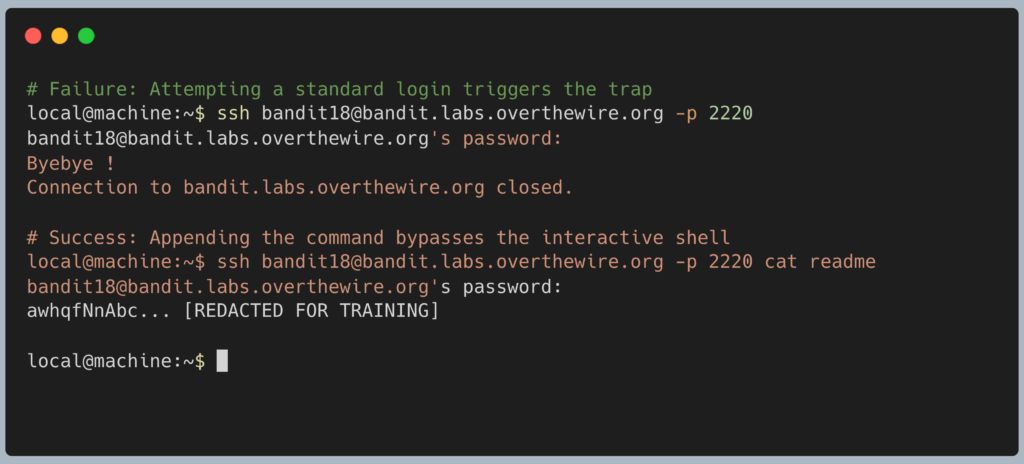
The SSH client will connect, bypass the interactive shell, grab the contents of the readme file, print it to your screen, and immediately close the connection. Copy the alphanumeric password to your clipboard. You do not need to type exit because you are already back on your local machine. Get ready to SSH in as bandit19.
DevOps in the Wild Executing commands directly over SSH is a foundational concept for Cloud Automation. Tools like Ansible, Jenkins, and Terraform do not open interactive terminal windows and “type” commands. When a central Ansible server needs to check the disk space on 500 different web servers simultaneously, it rapidly loops through an automated script running commands exactly like ssh root@webserver df -h, capturing the output without ever spawning a full shell.
Troubleshooting Pitfalls If your terminal is returning incorrect data or throwing errors, here is what went wrong:
- The terminal says
Byebye !and drops the connection You forgot to appendcat readmeto the end of your SSH command. You accidentally attempted a standard interactive login, and the.bashrctrap kicked you out. - Error:
cat: readme: No such file or directoryYou likely tried to run the command while still logged in asbandit17. You must execute this command from your local machine, pointing it at thebandit18user account. - Permission denied, please try again You copied the wrong password. Ensure you are using the password for
bandit18that you discovered using thediffcommand in the previous level.
Pingback: OverTheWire Bandit Challenge series – DigiSpidey