
Level 19 → 20: Privilege Escalation (The setuid Bit)
The Challenge
The Objective: You are currently logged in as bandit19. Your objective is to find the password for bandit20. The password is securely stored in /etc/bandit_pass/bandit20, but you cannot read it directly. Instead, you must use a custom executable file located in your home directory to retrieve it.
The Constraints:
- You are logged in as
bandit19. - You do not have the read permissions required to view the
/etc/bandit_pass/bandit20file. - There is a program in your current directory named
bandit20-dothat you must use to bypass this restriction.
The Solution
The Concept: Setuid (SUID) and Privilege Escalation In Linux, when you execute a program, that program normally runs with your user permissions. Because you are bandit19, any command you run is restricted by bandit19‘s access level.
However, there is a special file permission called setuid (Set Owner User ID). If a compiled program has the setuid bit enabled, it does not run with the permissions of the person who launched it. Instead, it temporarily elevates its privileges and runs with the permissions of the user who owns the file.
If you inspect the bandit20-do file, you will see it is owned by the user bandit20, and it has the setuid bit turned on. Therefore, when you run this program, any commands passed through it are executed as if bandit20 typed them. This allows you to read files that belong exclusively to bandit20.
Execution: Elevating Privileges and Extracting Follow these steps to analyze the binary, understand its syntax, and execute the read command.
Step 1: Verify the file’s ownership and look for the setuid bit. Type the following command and press Enter:
Bash
ls -la
(In the output, look at the permissions block. Instead of an ‘x’ for executable, you will see an ‘s’, indicating the setuid bit: -rwsr-x---)
Step 2: Run the program without any arguments to see how it expects to be used. Because it is a local file in your current directory, you must use ./ to execute it. Type the following command and press Enter:
Bash
./bandit20-do
(The program will print a help message: Run a command as another user. Example: ./bandit20-do id)
Step 3: Now that you know the syntax, run the program and pass it the cat command targeting the restricted password file. Type the following command exactly as it appears below, then press Enter:
Bash
./bandit20-do cat /etc/bandit_pass/bandit20
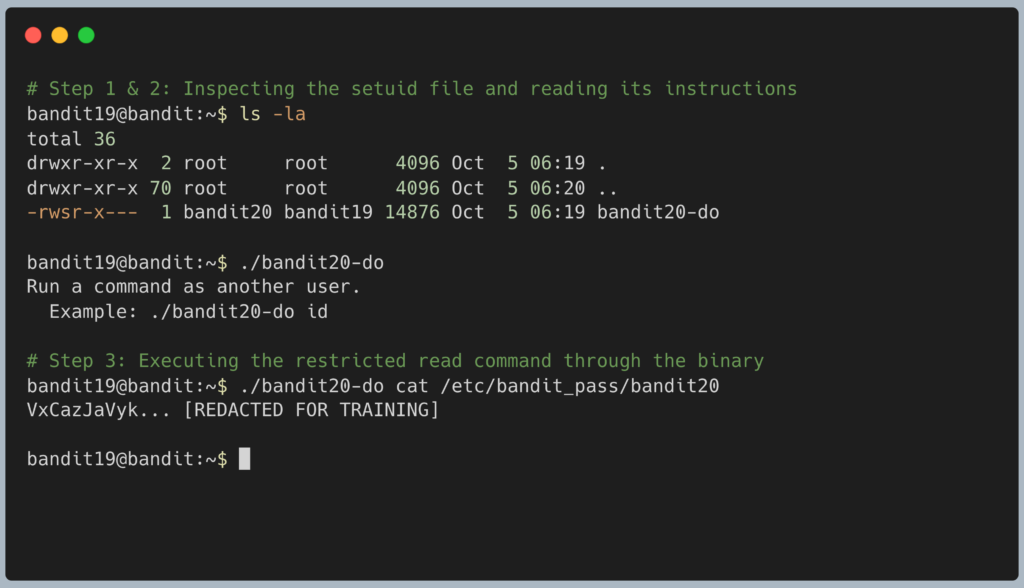
The program will temporarily elevate your privileges, execute the cat command as bandit20, and output the password to your screen. Copy this text to your clipboard. Type exit to close your connection, and get ready to SSH back in as bandit20.
DevOps in the Wild The setuid concept might seem like a massive security flaw, but it is actually a fundamental feature of Linux. The best example is the sudo command itself. When a junior engineer types sudo restart nginx, how do they have the power to do that? It is because the /usr/bin/sudo program is owned by the root administrator and has the setuid bit turned on. The system trusts the sudo program to handle the temporary privilege escalation securely.
Troubleshooting Pitfalls If your terminal is returning incorrect data or throwing errors, here is what went wrong:
- Error:
bandit20-do: command not foundYou forgot the./at the beginning of the command. Linux will only look in official system folders (like/bin) when you type a command. To run a custom program located in the folder you are currently standing in, you must explicitly tell Linux to look “right here” by using./. - Error:
cat: /etc/bandit_pass/bandit20: Permission deniedYou tried to run thecatcommand directly without passing it through thebandit20-doprogram first. - The terminal printed your current user ID information You likely ran
./bandit20-do id, copying the example from the help menu. You must replaceidwith the actual command you want to run.
Pingback: OverTheWire Bandit Challenge series – DigiSpidey