

Level 20 → 21: Reverse Connections (Listening Ports)
The Challenge
The Objective: You are currently logged in as bandit20. Your objective is to find the password for bandit21. You have been provided with a setuid binary named suconnect in your home directory that will grant you the next password, but only if you interact with it correctly over a local network connection.
The Constraints:
- You are logged in as
bandit20. - The
suconnectprogram does not wait for you to connect to it. Instead, it expects you to provide a port number, and it will actively reach out and connect to that port. - Once connected, it will read a line of text from your port. If that text exactly matches the current
bandit20password, it will transmit thebandit21password back to you.
The Solution
The Concept: Listening Ports and Background Processes In previous network levels, you used Netcat (nc) as a client to connect to an existing service. Now, the roles are reversed. You must use Netcat to build a temporary server that listens for incoming connections. By adding the -l (listen) and -p (port) flags, Netcat will open a port of your choosing and wait.
However, this creates a terminal traffic jam. If you run a listening command, it blocks your terminal screen indefinitely while it waits. If your terminal is blocked, how can you run the ./suconnect program to actually make the connection?
You have two options: open a second SSH session in a new window, or use Job Control. By adding an ampersand (&) to the very end of a Linux command, you instruct the operating system to run that process silently in the background. This instantly returns control of your terminal prompt, allowing you to run the second command while the first one waits patiently out of sight.
Execution: Building the Listener and Connecting Follow these steps to set up the listener, push it to the background, and trigger the binary.
Step 1: Create the listener. You will pipe your current bandit20 password directly into Netcat, instruct it to listen on an arbitrary high port (e.g., 4444), and push it to the background using &. Type the following command (substituting your actual full password) and press Enter:
Bash
echo "VxCazJaVyk..." | nc -l -p 4444 &
(The terminal will output a number in brackets, such as [1] 12345. This is the background job ID and process ID. Your prompt will immediately return).
Step 2: Now that the trap is set, trigger the binary and point it at the port you just opened. Type the following command and press Enter:
Bash
./suconnect 4444
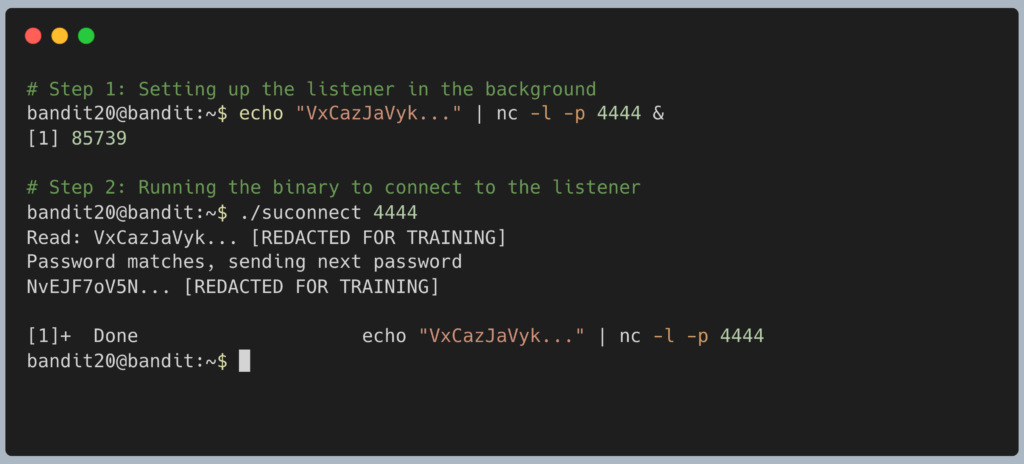
The suconnect program will connect, read the piped password, verify it, and print the password for Level 21 to your screen. Copy this text to your clipboard. Type exit to close your connection, and get ready to SSH back in as bandit21.
DevOps in the Wild The ability to stand up a temporary listener is a critical skill for Penetration Testers and Security Engineers. When testing if a corporate firewall is blocking outbound traffic (egress filtering), an engineer will set up a Netcat listener on a remote server and then attempt to ping or connect to it from inside the corporate network. If the connection arrives, they know the firewall has a hole in it. This exact technique is also how “Reverse Shells” operate during cyber attacks.
Troubleshooting Pitfalls If your terminal is throwing errors or freezing, here is what went wrong:
- Error:
nc: Address already in useAnother student on the Bandit server happens to be using port 4444 at this exact moment. Simply choose a different random number between 1024 and 65535 (e.g.,8888or12345) and update both of your commands to match. - My terminal is completely frozen and unresponsive You likely forgot the
&at the end of the Netcat command. The listener is running in the foreground and has taken over your screen. PressCtrl + Cto kill the listener, then try Step 1 again, making sure to include the ampersand. - The program output
Read: VxCazJaVyk... Password does not matchYou typed the password incorrectly in theechocommand, or you accidentally included an extra space before the closing quotation mark.