

Level 30 → 31: Tagging Releases (Git Tags)
The Challenge
The Objective: You are currently logged in as bandit30. Your objective is to find the password for bandit31. The password is once again hidden inside a Git repository.
The Constraints:
- You are logged in as
bandit30. - You have the repository URL:
ssh://bandit30-git@localhost:2220/home/bandit30-git/repo. - When you clone the repository and read the
README.mdfile, you will find it is completely empty except for a hint: “just an empty file… lets look at the tags”. - Searching the commit history (
git log) or alternate branches (git branch -a) will not reveal the password.
The Solution
The Concept: Git Tags In the previous level, you learned about branches—parallel timelines where developers can work on active code. Branches are dynamic; they move forward every time someone makes a new commit.
However, sometimes you need to place a permanent, unmoving bookmark on a specific moment in time. In Git, this is called a Tag. Tags are most commonly used to mark official software releases (e.g., tagging a specific commit as v1.0.0 or v2.4.1). Once a tag is placed on a commit, it acts as a permanent, searchable label that points to that exact snapshot.
To solve this level, you will use the git tag command to list all the bookmarks the developer left behind. Once you find a suspicious tag, you will use git show [tag-name] to reveal the data stored at that specific bookmark.
Execution: Building the Workspace and Searching Tags Follow these steps to clone the repository, list the tags, and extract the password.
Step 1: Create your secure workspace, move into it, and clone the repository over port 2220. Type the following commands, pressing Enter after each:
Bash
mktemp -d
cd /tmp/tmp.xyz123
git clone ssh://bandit30-git@localhost:2220/home/bandit30-git/repo
(Type yes if prompted, then paste your bandit30 password).
Step 2: Move into the repository and read the current README file.
Bash
cd repo
cat README.md
(You will see the hint: just an empty file... lets look at the tags).
Step 3: Ask Git to list all the tags associated with this repository. Type the following command and press Enter:
Bash
git tag
(The terminal will output a single tag named secret).
Step 4: Use the show command to inspect the contents of that tag. Type the following command and press Enter:
Bash
git show secret
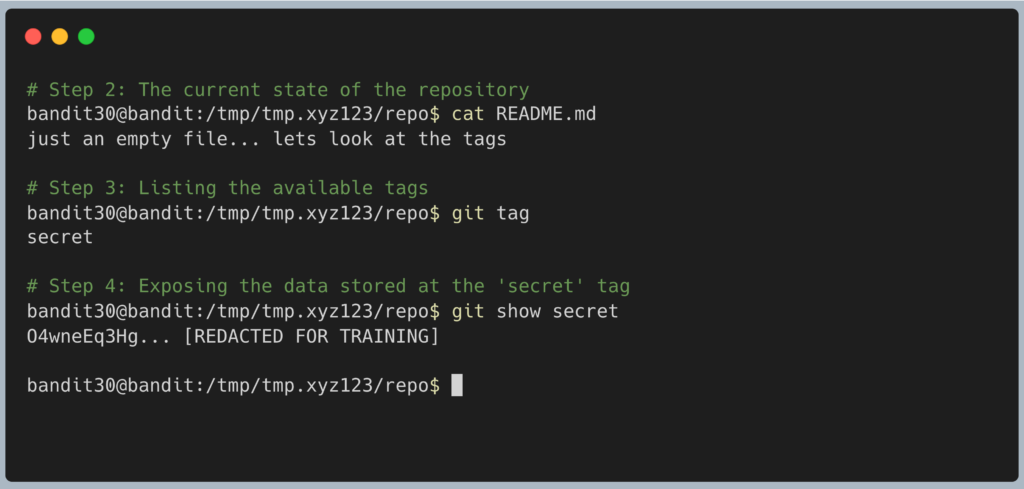
The terminal will output the commit information along with the password for Level 31. Copy this text to your clipboard. Type exit to close your connection, and get ready to SSH back in as bandit31.
DevOps in the Wild Tags are a fundamental trigger for modern Continuous Deployment (CD) pipelines. In a mature DevOps environment, developers do not manually push code to production servers. Instead, when a team leader creates a new Git tag named v3.0 and pushes it to GitHub, an automated pipeline detects the new tag, packages the code into a Docker container, tests it, and automatically deploys it to the live servers.
Troubleshooting Pitfalls If your terminal is throwing errors, here is what went wrong:
- Error:
fatal: not a git repositoryYou forgot to runcd repoafter cloning. Thegit tagcommand only works if you are actively standing inside the repository directory. - The
git showcommand opened a pager and I am stuck If the output ofgit show secretis longer than your terminal window, Git will pause the output. Simply press theqkey on your keyboard to quit the pager and return to your prompt.