
Level 27 → 28: Introduction to Git (Cloning a Repository)
The Challenge
The Objective: You are currently logged in as bandit27. Your objective is to find the password for bandit28. The password is not hidden on the local filesystem; instead, it is stored inside a Git repository.
The Constraints:
- You are logged in as
bandit27. - You have been provided with the repository URL:
ssh://bandit27-git@localhost/home/bandit27-git/repo. - You do not have write access to your current home directory, meaning you cannot download the repository here. You must build a temporary workspace first.
The Solution
The Concept: Version Control and Remote Repositories Git is the industry-standard version control system used by software developers to track changes in code. Rather than just copying and pasting files, Git allows teams to maintain a full historical timeline of a project.
The command git clone is used to download an exact copy of a remote repository onto your local machine. Because this specific repository is hosted locally on the Bandit server but requires network authentication, you must clone it over SSH.
There is a slight catch: standard SSH connects on port 22, but the Bandit server’s SSH daemon runs on port 2220. Therefore, you must explicitly declare the port number in your Git clone URL so Git knows exactly where to knock.
Execution: Building the Workspace and Cloning Follow these steps to create your temporary directory, clone the repository, and read the password.
Step 1: Create a temporary directory, copy the path, and move into it. Type the following commands, pressing Enter after each:
Bash
mktemp -d
(The terminal will output a randomized path, such as /tmp/tmp.xyz123. Use your specific path for the next command).
Bash
cd /tmp/tmp.xyz123
Step 2: Clone the repository using the explicitly defined SSH port. Type the following command exactly as it appears below, then press Enter:
Bash
git clone ssh://bandit27-git@localhost:2220/home/bandit27-git/repo
Step 3: The system will ask you to confirm the connection (type yes and press Enter) and then prompt you for a password. Paste your current bandit27 password and press Enter. (Git will download the files and create a new folder named repo in your workspace).
Step 4: Move into the newly downloaded repository folder and read the README file. Type the following commands, pressing Enter after each:
Bash
cd repo
cat README
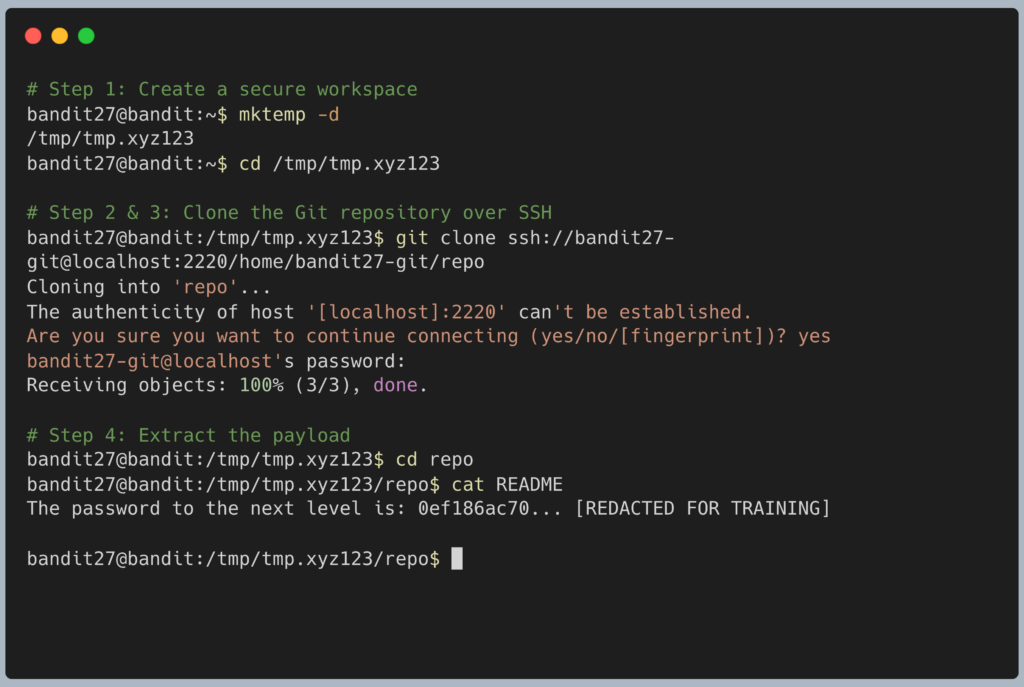
The terminal will output the password for Level 28. Copy this text to your clipboard. Type exit to close your connection, and get ready to SSH back in as bandit28.
DevOps in the Wild Understanding git clone is the very first step in modern software development. When a new DevOps engineer or developer joins a company, day one consists of generating an SSH key, adding it to the company’s GitHub or GitLab account, and running git clone to pull down the corporate codebase to their local laptop so they can start working.
Troubleshooting Pitfalls If your terminal is throwing errors, here is what went wrong:
- Error:
fatal: could not create work tree dir 'repo': Permission deniedYou tried to run thegit clonecommand while still standing in thebandit27home directory. You must complete Step 1 to create and move into your/tmpdirectory first. - Error:
ssh: connect to host localhost port 22: Connection refusedYou forgot to add:2220to the URL. The command tried to connect to the default SSH port, but the Bandit server only listens on port 2220. - Permission denied, please try again. You copied the wrong password. The password for the
bandit27-gituser is the exact same password you used to log into thebandit27account.
Pingback: OverTheWire Bandit Challenge series – DigiSpidey