
Level 25 → 26: Breaking Out of the Shell (The Pager Escape)
The Challenge
The Objective: You are currently logged in as bandit25. Your objective is to log into bandit26 and retrieve its password. You have been provided with an SSH private key named bandit26.sshkey in your current home directory to make the connection.
The Constraints:
- You are logged in as
bandit25. - When you attempt to use the key to SSH into
bandit26, the server displays a massive ASCII art logo and then immediately drops your connection, kicking you out before you can type a single command. - You must find a way to break out of this trap and force the system to give you an interactive terminal prompt.
The Solution
The Concept: Default Shells and “Living off the Land” When a user account is created in Linux, the administrator defines its “Login Shell” in the /etc/passwd file. Normally, this is set to /bin/bash, giving you a standard terminal. However, for bandit26, the administrator set the login shell to a custom script (/usr/bin/showtext).
If you read this script, you will see it simply uses the more command to display a text file containing the ASCII logo, and then exits. When the script exits, your SSH session ends.
To beat this level, you must exploit how the more command works. more is a “pager”—a program designed to let you read long documents one page at a time. If your terminal window is large enough to fit the entire ASCII logo at once, more prints it and immediately closes. However, if your terminal window is too small to fit the text, more will pause and display a --More-- prompt at the bottom of the screen, waiting for you to press Space to scroll down.
This pause is your window of opportunity. While paused inside more, pressing the v key instantly opens the vi text editor. From inside vi, you can change your environment variables and spawn a completely fresh, unrestricted Bash shell, bypassing the trap entirely.
Execution: Shrinking the Window and Escaping Follow these steps to force the pause, exploit the text editor, and extract the password.
Step 1: Before doing anything, use your mouse to resize your actual terminal window. Make it as short as possible vertically (about 3 or 4 lines high).
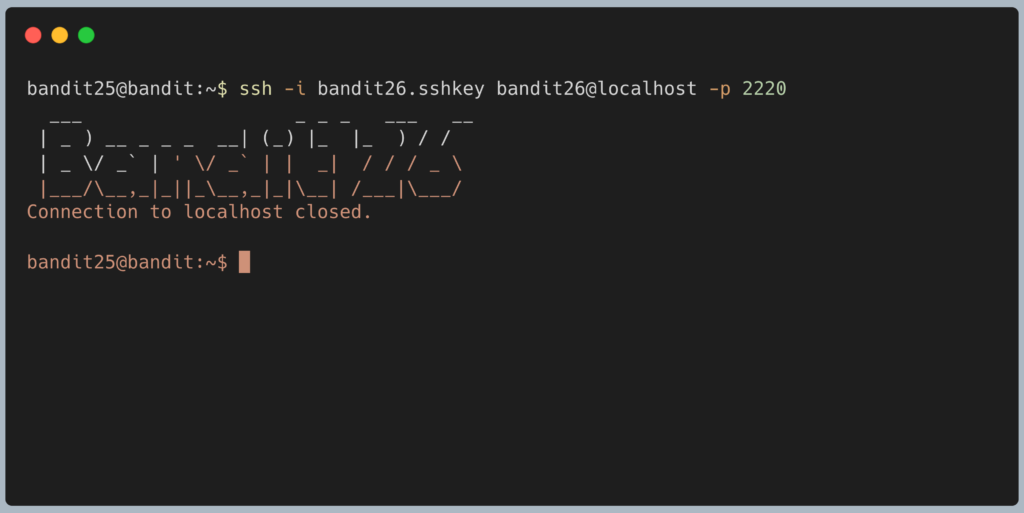
Step 2: With your tiny terminal window, initiate the SSH connection using the provided private key targeting localhost. Type the following command and press Enter:
Bash
ssh -i bandit26.sshkey bandit26@localhost -p 2220
Step 3: Because your window is so small, the ASCII logo will not fit. The screen will pause, and you will see --More--(XX%) at the bottom.
Step 4: Press the v key on your keyboard. (The screen will change. You are now inside the vi text editor).
Step 5: You can now maximize your terminal window so you can see what you are doing.
Step 6: You must tell vi to use bash, and then launch it. Type the following sequence exactly, pressing Enter after each line:
Bash
:set shell=/bin/bash
:sh
(You will instantly be dropped into a blank terminal prompt. You have successfully escaped!)
Step 7: Retrieve the password. Type the following command and press Enter:
Bash
cat /etc/bandit_pass/bandit26
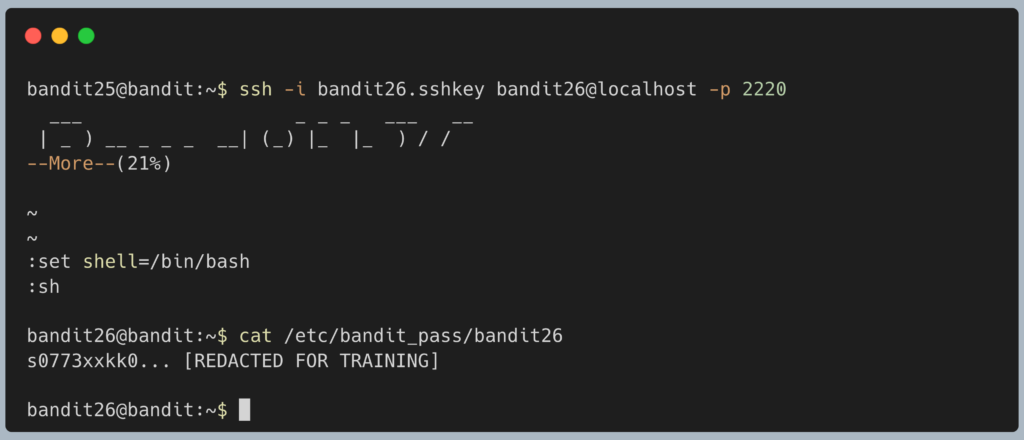
The terminal will output the password for Level 26. Copy this text to your clipboard. Type exit to close the escaped shell, type :q to quit vi, and type exit to close your original SSH session.
DevOps in the Wild In the cybersecurity world, breaking out of restricted environments using installed tools is called “Living off the Land” (LotL). Pagers (more, less) and editors (vi, nano) are notorious for this. System administrators will often try to lock down a junior engineer’s account so they can only view log files, but if the engineer uses less to view those logs, they can easily press v, open vi, and spawn a root shell. This is why security engineers rely on resources like GTFOBins (a curated list of Unix binaries that can be exploited) to ensure they aren’t accidentally giving attackers a clear path to privilege escalation.
Troubleshooting Pitfalls If your terminal is acting strangely or you keep getting kicked out, here is what went wrong:
- The terminal still says
Connection to localhost closedimmediately Your terminal window is still too tall. You must shrink it vertically until it looks almost unusable. Themorecommand must run out of vertical space to trigger the pause. - I am in
vi, but typing:just prints letters on the screen You might have accidentally entered Insert Mode. Press theEsckey on your keyboard once or twice, then try typing:set shell=/bin/bashagain. - Error:
ssh: Could not resolve hostname localhostMake sure you are logged intobandit25when you run the SSH command. If you try to run this from your local computer,localhostpoints to your laptop, not the Bandit server.
Pingback: OverTheWire Bandit Challenge series – DigiSpidey