
Level 26 → 27: Privilege Escalation (Encore)
The Challenge
The Objective: You have successfully broken out of the pager trap and are now sitting at an interactive prompt as bandit26. Your objective is to find the password for bandit27.
The Constraints:
- You are logged in as
bandit26. - You do not have direct read access to
/etc/bandit_pass/bandit27. - You must leverage a local file to elevate your privileges and extract the password.
The Solution
The Concept: SUID Revisited If you look around your current directory, you will experience a moment of déjà vu. The mechanics for this level are identical to Level 19 → 20.
You are provided with a custom executable named bandit27-do that has the setuid (SUID) bit enabled. Because the file is owned by bandit27 and has the s permission set, executing it allows you to run commands with bandit27‘s privileges.
The creators of the wargame put this here to test if your escaped shell from the previous level is fully functional. Since you managed to spawn /bin/bash from inside vi, you have a working terminal and everything you need to execute this binary.
Execution: Elevating and Extracting Follow these steps to extract the password using the setuid binary.
Step 1: Verify the contents of your current directory and check the file permissions. Type the following command and press Enter:
Bash
ls -la
(You will see bandit27-do with the -rwsr-x--- permission block, confirming the setuid bit is active).
Step 2: Use the binary to run the cat command against the protected password file. Type the following command exactly as it appears below, then press Enter:
Bash
./bandit27-do cat /etc/bandit_pass/bandit27
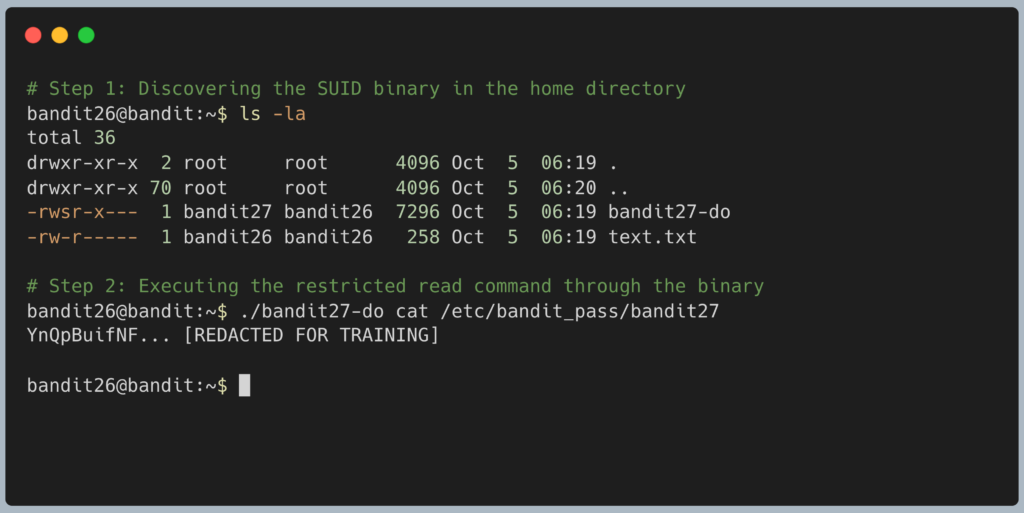
The program will execute the command as the higher-privileged user and output the password for Level 27. Copy this text to your clipboard. Type exit to close your escaped shell, and get ready to SSH back in normally as bandit27.
DevOps in the Wild Why do attackers love SUID binaries? This level demonstrates why. In a real-world breach, if a hacker manages to get a low-level foothold on a server (like escaping a restricted shell or exploiting a web app), their very first move is to run a command like find / -perm -4000 2>/dev/null. This searches the entire server for any file with the SUID bit set. If a lazy administrator left a custom backup script or a text editor with SUID root privileges, the attacker will hijack it to instantly gain full control of the machine.
Troubleshooting Pitfalls If your terminal is throwing errors, here is what went wrong:
- Error:
bandit27-do: command not foundYou forgot the./before the filename. You must explicitly tell Linux to run the custom executable located in your current directory. - Error:
cat: /etc/bandit_pass/bandit27: Permission deniedYou tried to read the password file directly without passing it through the SUID binary first. Your standardbandit26user does not have permission to do that.