
Level 31 → 32: Bypassing Gitignore (Pushing Commits)
The Challenge
The Objective: You are currently logged in as bandit31. Your objective is to find the password for bandit32. Once again, you are dealing with a Git repository, but this time you are not just reading data—you must actively modify the remote server.
The Constraints:
- You are logged in as
bandit31. - You have the repository URL:
ssh://bandit31-git@localhost:2220/home/bandit31-git/repo. - When you clone the repository and read the
README.mdfile, it will instruct you to push a file namedkey.txtcontaining the exact phraseMay I come in?. - If you try to add this file to the repository normally, Git will aggressively block you from doing it.
The Solution
The Concept: The .gitignore File and Forced Pushes In professional software development, you do not want every single file on your laptop uploaded to the central server. Things like temporary system files, massive databases, and sensitive credential files (like .env) should stay strictly local.
To manage this, developers use a hidden file called .gitignore. This file contains a list of rules that tells Git exactly which files to make completely invisible to the version control system.
If you list the hidden files in this repository (ls -la), you will see a .gitignore file. If you read it, you will notice it contains a rule specifically instructing Git to ignore any file named *.txt. This is a trap designed to stop you from uploading the key.txt file requested by the README.
To beat this level, you must use the -f (force) flag with your git add command. This tells Git: “I know this file is on the blocklist, but I am the administrator and I am explicitly ordering you to track it anyway.”
Execution: Building, Forcing, and Pushing Follow these steps to clone the repository, bypass the blocklist, and upload your payload.
Step 1: Create your secure workspace, move into it, and clone the repository over port 2220. Type the following commands, pressing Enter after each:
Bash
mktemp -d
cd /tmp/tmp.xyz123
git clone ssh://bandit31-git@localhost:2220/home/bandit31-git/repo
(Type yes if prompted, then paste your bandit31 password).
Step 2: Move into the repository and verify the instructions in the README.
Bash
cd repo
cat README.md
Step 3: Create the requested file with the exact required text. Type the following command and press Enter:
Bash
echo "May I come in?" > key.txt
Step 4: Force Git to add the file, bypassing the .gitignore rules. Type the following command and press Enter:
Bash
git add -f key.txt
Step 5: Commit your changes to the timeline. Type the following command and press Enter:
Bash
git commit -m "Adding the key"
Step 6: Push your committed changes back to the remote server. Type the following command and press Enter:
Bash
git push
(When prompted for a password, paste your bandit31 password again).
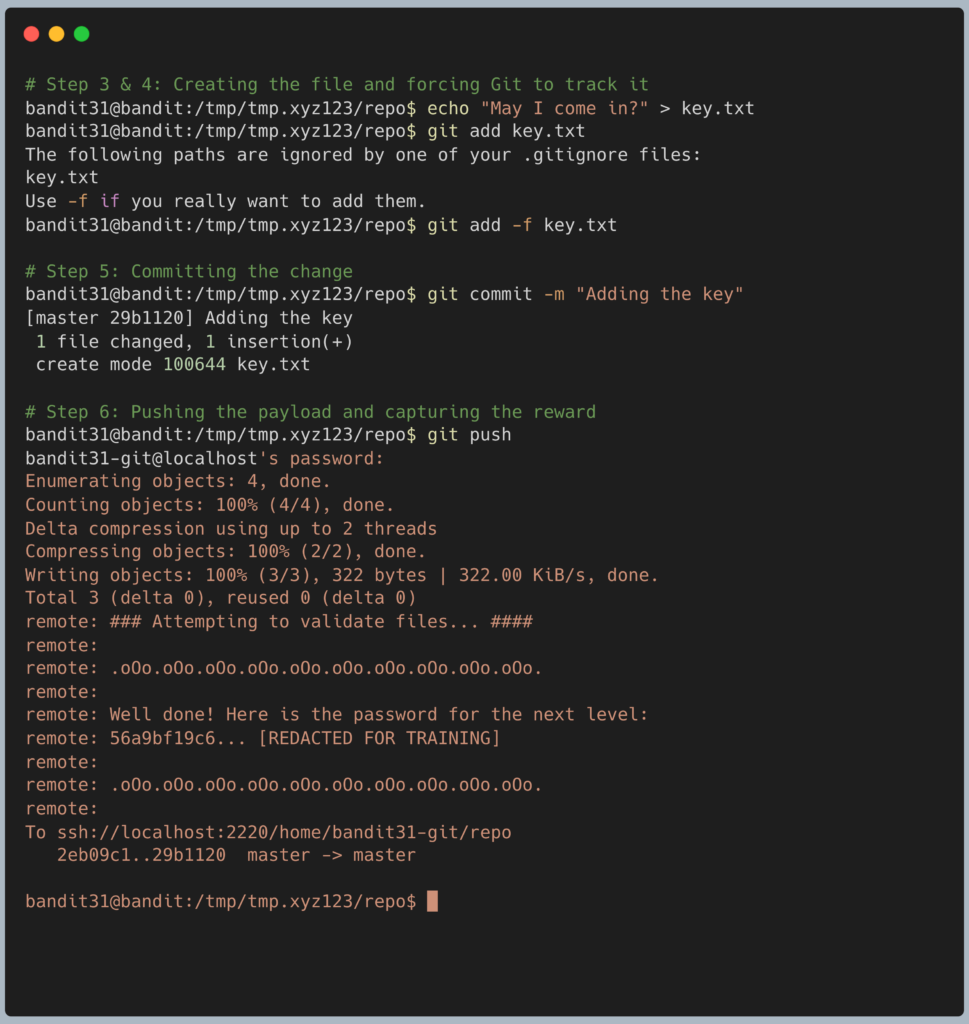
The remote server has a custom script listening for uploads. When it sees your forced key.txt file arrive, it will automatically reply with the password for Level 32 directly in the terminal output. Copy this text to your clipboard. Type exit to close your connection, and get ready to SSH back in as bandit32.
DevOps in the Wild The .gitignore file is arguably one of the most important security mechanisms in a repository. When an engineer starts a new Node.js project, they immediately add node_modules/ to their .gitignore so they don’t accidentally upload 500 megabytes of open-source library code. More importantly, they add .env to ensure their local API keys and database passwords are never pushed to the central server. The -f flag is rarely used in production, but it is necessary when a specific, required file happens to match a broader ignore rule.
Troubleshooting Pitfalls If your terminal is throwing errors, here is what went wrong:
- Error:
The following paths are ignored by one of your .gitignore files: key.txtYou tried to rungit add key.txtnormally. You missed Step 4. You must include the-fflag to force the addition. - Error:
Everything up-to-datewhen runninggit pushYou either forgot to run thegit commitcommand in Step 5, or you did not successfully add the file in Step 4. Git has nothing new to push to the server. - The push was successful, but the server didn’t give me the password You likely made a typo in the
key.txtfile. The server expects the exact stringMay I come in?. If you forgot the question mark or messed up the capitalization, the server will reject the submission.