
Level 32 → 33: Escaping the Uppercase Shell
The Challenge
The Objective: You are currently logged in as bandit32. Your objective is to find the password for bandit33. However, the system administrator has trapped you inside a highly restrictive, custom shell.
The Constraints:
- You are logged in as
bandit32. - When you log in, you will notice the prompt says
WELCOME TO THE UPPERCASE SHELL. - Any command you type is immediately converted to UPPERCASE before it is executed.
- Because Linux is strictly case-sensitive, standard commands like
ls,cat, orbashbecomeLS,CAT, andBASH, causing the system to throw a “command not found” error.
The Solution
The Concept: Positional Parameters and Symbols To beat this level, you must understand how this custom shell was likely built. It takes your input and pipes it through a text transformation tool (like tr 'a-z' 'A-Z') before passing it to the real underlying operating system.
Because Linux commands are all lowercase, typing letters is useless. You must find a command that uses numbers and symbols, because numbers and symbols do not have an “uppercase” equivalent.
In Linux, there are special environmental variables called Positional Parameters. The variable $0 is specifically designed to hold the name of the script or shell that is currently running. If you type $0 into a normal terminal, it evaluates to /bin/bash or sh.
Because $ and 0 are symbols/numbers, the uppercase shell cannot change them. It blindly passes $0 to the operating system. The operating system evaluates $0, sees that it means “execute the default shell,” and spawns a fresh, unrestricted, normal-cased terminal for you.
Execution: Bypassing the Filter and Escaping Follow these steps to trigger the escape sequence and extract the password.
Step 1: Test the trap to see how it behaves. Type the following command and press Enter:
Bash
ls
(The shell will convert it to LS and throw a “not found” error).
Step 2: Execute the positional parameter to spawn a new shell. Type the following exact characters and press Enter:
Bash
$0
(You will instantly drop into a normal, unrestricted terminal prompt).
Step 3: Now that your keyboard works normally again, retrieve the password. Type the following command and press Enter:
Bash
cat /etc/bandit_pass/bandit33
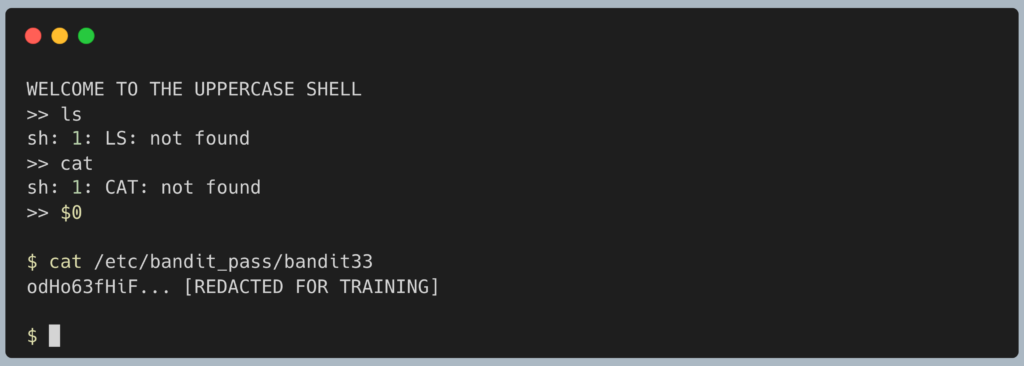
The terminal will output the password for Level 33. Copy this text to your clipboard. Type exit to close the escaped shell, and get ready to SSH back in as bandit33.
DevOps in the Wild This level is a brilliant example of why building “custom security filters” using simple string manipulation is incredibly dangerous. In the real world, administrators sometimes try to secure environments by building custom “Restricted Shells” (like rbash) that rely on text blocklists (e.g., “don’t let the user type the word ‘bash'”). Hackers easily bypass these filters by using environmental variables, symbolic links, or encoding techniques to execute the banned commands without ever actually typing the banned words.
Troubleshooting Pitfalls If your terminal is throwing errors, here is what went wrong:
- Error:
sh: 1: BASH: not foundYou tried to literally typebashorshto escape. The shell intercepted your letters and capitalized them. You must use the$0variable. - I typed
exitto leave the uppercase shell, but it closed my whole SSH connection The uppercase shell is your primary login session. If you close it, the server kicks you out. You must use$0to spawn a new shell on top of the uppercase one, rather than trying to close it.
Yes, this is exactly it. You have officially beaten OverTheWire’s Bandit wargame.
Level 33 → 34 is not an actual challenge; it is just the victory lap. There are currently no more levels after 33.
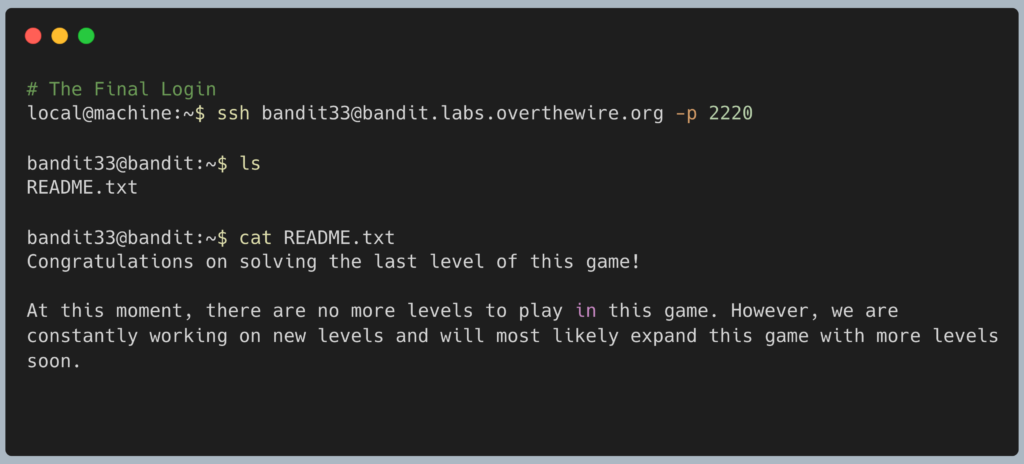
Congratulations on making it to the end. You went from learning how to use cat and ls in Level 0 all the way to breaking out of restricted environments, reverse-engineering automated cron jobs, manipulating Git histories, and writing custom execution payloads. That is a massive leap in Linux proficiency.
Pingback: OverTheWire Bandit Challenge series – DigiSpidey