
Level 17 → 18: File Comparison (The diff Command)
The Challenge
The Objective: You must first log in as bandit17 using the RSA Private Key you extracted in the previous level. Once inside, your objective is to find the password for bandit18 stored in your home directory.
The Constraints:
- You must authenticate using the
sshkey17.privatefile saved on your local machine. - There are two files in the home directory:
passwords.oldandpasswords.new. - The password for the next level is the only line of text that has been changed between the two files.
The Solution
The Concept: Delta and File Comparison When working with configuration files or source code, it is impossible to manually read two massive text files side-by-side to spot a single changed character.
To automate this, Linux provides the diff (difference) command. The diff command analyzes two files line-by-line and outputs the “delta”—the exact lines that were added, removed, or modified.
When you run diff file1 file2, the terminal uses specific symbols to tell you what happened:
<(Less than): This indicates a line that exists in the first file but is missing from the second file (a deletion).>(Greater than): This indicates a line that exists in the second file but is missing from the first file (an addition).
Because passwords.new is the updated file, you are looking for the line marked with the > symbol.
Execution: Authenticating and Comparing Follow these steps to properly secure your private key, log in, and compare the files.
Step 1: Before SSH will accept your private key, you must lock down its permissions on your local machine. If the file is readable by other users on your computer, SSH will reject it for security reasons. Open your local terminal where the key is saved, type the following command, and press Enter:
Bash
chmod 600 sshkey17.private
Step 2: Log into the Bandit server using the secured key. Type the following command and press Enter:
Bash
ssh -i sshkey17.private bandit17@bandit.labs.overthewire.org -p 2220
Step 3: Now that you are logged in as bandit17, verify the files are present and run the comparison. Type the following command exactly as it appears below, then press Enter:
Bash
diff passwords.old passwords.new
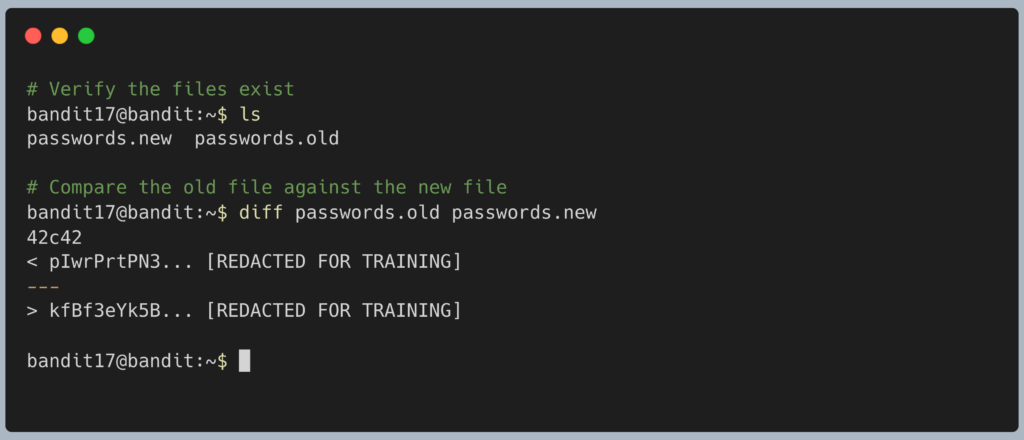
The terminal will output the two lines that differ. The line pointing to the right (>) from the passwords.new file is your password for Level 18. Copy this alphanumeric string to your clipboard. Type exit to close your connection, and get ready to SSH back in as bandit18.
DevOps in the Wild The diff command is the foundational logic behind Git, the version control system used by virtually every software developer on the planet. When a developer types git diff to review their code before sending it to production, the system is executing this exact same line-by-line comparison to ensure they didn’t accidentally break a working configuration.
Troubleshooting Pitfalls If your terminal is returning incorrect data or throwing errors, here is what went wrong:
- Error:
UNPROTECTED PRIVATE KEY FILE!You skipped Step 1. SSH is fiercely protective of private keys. You must runchmod 600 sshkey17.privateon your local machine so that only your specific user account can read the file. - The output symbols are backward (the
<has the new password) You reversed the file order in your command and typeddiff passwords.new passwords.old. Thediffcommand strictly compares the second file against the first file. It is best practice to always put the older file first chronologically. - The terminal asks you for
bandit17‘s password You either forgot the-i sshkey17.privateflag when logging in, or you are running the SSH command from a different local directory than where you saved the key file.